Thursday, April 3, 2014

Working Drawings Chapter 9

3 major components of working drawings:
1. Drawing that shows how parts are assembled
2.Orthographic views of all the parts
3. Notes for all the standard parts

Assembly Drawings:
First(or last) page in a set of working drawings
Used to show how all the parts fit together.
Pictorial format - isometric, or perspective
Oriented to best show geometry of parts
Route lines - lines connecting components to one another
No hidden lines, centerlines, or dimensions
Part number balloon - circle with number that identifies part
Keep Part numbers consistent through drawing
Table with parts list - corresponding to part numbers.

Typical parts list:
Part number
Part name
Material Used
Required Quantity

Collapsed (parts assembled together)
Exploded (the assembly pulled apart)


Create pg 350, 351, 352


To insert a table, just type "TABLE", then fill in the cells like you would in excel.


For the Balloons with leader lines, type in "TP" for Tool Pallet.
Annotation - tag.
Check out all of the other tools in the tool pallet while you are there!
To rescale the size, or change anything, just select it, right click, and go to the properties box.


Detail Drawings
Orthogonal views
Dimensions for manufacturing
Part name tag
Part number balloon tag


Just use your normal dimensioning tools, then go back and double click on the dim to add more info.

%%c makes the diameter symbol


 Part Notes:

Vendor items
no orthographic views, just need a note with part info
 
Construction notes if needed
Outline how to assemble parts, what types of glues and materials to use, etc.


Create a full set of working drawings for your piston, and for your final semester project.

Wednesday, April 2, 2014

Gas Power Cycles

Part of the Point of 1304?
Learn how to visualize problems and equipment.  It's not just learning computer software, it's learning how to visualize and better understand engineering systems.  

Review:
http://www.grc.nasa.gov/WWW/k-12/airplane/engparts.html

Vocab:

Engine - System used to produce a net power output


Mechanical cycle - a sequence of processes that begin and end at the same state.

Gas cycle - working fluid remains a gas through the entire cycle.
Vapor cycle - fluid alternates between liquid and vapor through the cycle


Closed cycle - working fluid is returned to initial state, and recirculated, heat crosses boundaries, moving parts produce work, but fluids do not cross boundary.
.
.
.


Open cycle - fluid comes in, gets used up, then exhausts out, the working fluid does not go through a complete thermodynamic cycle.


External combustion engine: Steam power plant, energy is supplied from an external source, such as a furnace, geothermal well, nuclear reactor, the sun, etc.


Internal combustion engine: Fuel is burned inside of the system.
Analysis of Power Cycles:

Start with an Ideal Cycle
Assume reversible process, ignore friction, assume system is in thermodynamic equilibrium, ignore unwanted heat loss to surroundings.

Reversible process: adiabatic (no heat loss out of system), you can go back and forth between state 1 and state 2 either in forward or in reverse, the path does not matter.


Idealized model - study major parameters without being bogged down with details.
Trends in ideal cycles match trends in actual cycles
#'s in ideal cycles do not match #'s in actual cycles

Ideal assumptions:
No friction between moving parts
Quasi-equilibrium expansion and compression processes
Negligible heat transfer in connecting parts.

4 strokes:


Work done by a Gas:
https://www.grc.nasa.gov/www/k-12/airplane/work2.html


Work = area inside the P-v loop


https://www.grc.nasa.gov/www/k-12/airplane/otto.html


Carnot - most efficient ideal cycle


isothermal = constant T
Adiabatic = no heat transfer/loss, perfectly insulated walls.


https://www.grc.nasa.gov/www/k-12/airplane/carnot.html


http://en.wikipedia.org/wiki/Carnot_heat_engine

The area enclosed by the cycle on a p-V diagram is proportional to the work produced by the cycle.


What do these ideal cycles teach us?

Thermal efficiency (gas mileage) increases with compression ratio.

Compression ratio - CR

\mbox{CR} = \frac { \tfrac{\pi}{4} b^2 s + V_c } {V_c}, where
b\; = cylinder bore (diameter)
s\; = piston stroke length
V_c\; = clearance volume - the volume of the combustion chamber (including head gasket). This is the minimum volume of the space at the end of the compression stroke, i.e. when the piston reaches top dead center (TDC). Because of the complex shape of this space, it is usually measured directly rather than calculated.


Diesel engines - better compression ratios, Why?

Consider fire pistons:


Diesel engine - no spark plug, direct fuel injection, fuel ignites through compression.  Fuel injected after air is compressed so no worries on compression ratios = better fuel economy. (Trick is injecting fuel to mix homogeneously with air)

Gasoline engine - carburetor mixes air and fuel, then fuel is ignited by spark plug.  (If it ignites on it's own, the timing will be off, and you get engine knock, so there's an upper limit to the compression ratio you can use.)


Higher octane fuels - combustion at higher temp - increased compression ratios.

Gasoline - C9H20
Diesel - C14H30 - longer chain, heavier more oily fuel, less refined so cheaper to make, evaporates more slowly than gas, higher energy density, greater MPG,... pollutes more than gas.


http://www.hedelin.se/drawings_engine.html


http://www.animatedengines.com/otto.html

Project: Design a pistonRead through this:
http://confident-instruments.com/Piston_Study.htm


Piston:
http://en.wikipedia.org/wiki/Piston
Piston Rings:
 http://en.wikipedia.org/wiki/Piston_ring
Wrist Pin:
http://en.wikipedia.org/wiki/Wrist_pin
Connecting Rod:
 http://en.wikipedia.org/wiki/Connecting_rod
Crank Shaft:
 http://en.wikipedia.org/wiki/Crankshaft
Cam Shaft:
 http://en.wikipedia.org/wiki/Camshaft


Choose your materials, and include tolerances in your views.


http://www.mahle-aftermarket.com/MAHLE_Aftermarket_NA/en/Products-&-Services/Engine-components/Light-Vehicle/Pistons

Piston Schematics:


AA..... Distance between bosses
F...... Top land height
GL..... Total length
KH..... Compression height
MO..... Combustion chamber diameter
MT..... Combustion chamber depth
MV..... Combustion chamber offset
UH..... Dome height
VT..... Valve recess depth


Do a Google image search, choose a make/model, dimension everything out!

Read through:
http://courses.washington.edu/engr100/Section_Wei/engine/UofWindsorManual/Piston%20and%20Piston%20Rings.htm


http://courses.washington.edu/engr100/Section_Wei/engine/UofWindsorManual/Piston%20Design.htm


Machining Processes & Tolerances:


Boring:  http://en.wikipedia.org/wiki/Boring_%28manufacturing%29


Lapping - http://en.wikipedia.org/wiki/Lapping

Honing - http://en.wikipedia.org/wiki/Honing_%28metalworking%29


Grinding: http://en.wikipedia.org/wiki/Grinding_machine

diamond turning: http://en.wikipedia.org/wiki/Diamond_turning


Reaming: http://en.wikipedia.org/wiki/Reamer


Turning: http://en.wikipedia.org/wiki/Turning

powder metal-sintered: http://en.wikipedia.org/wiki/Sintering


milling: http://en.wikipedia.org/wiki/Milling_%28machining%29

planing & shaping: http://en.wikipedia.org/wiki/Planing_%28shaping%29

Drilling: http://en.wikipedia.org/wiki/Drilling
pinching,
Die Casting: http://en.wikipedia.org/wiki/Die_casting

Turning: http://en.wikipedia.org/wiki/Turning


Tuesday, April 1, 2014

Geometric Tolerances in CAD

Draw a rectangle (just for something to add labels to)

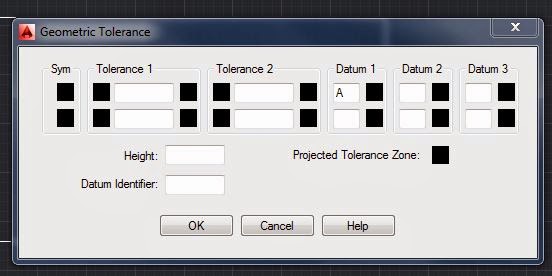
In Annotate, click on "Tolerance", or type TOLERANCE into command line.


To add a Datum label - just type "A" in Datum 1, hit "ok"

>Enter Tolerance Location > click where you want your label to go.  You can move the box around later if you need to.


To automatically add a tolerance label with a leader line:
type QLEADER
<settings>


Note: You might have to re-size your datum arrows and text - just right click on it, select properties, and change it.


Now let's add a geometric tolerance box, that shows one side should be perpendicular to A with a tolerance of .0004.

Type in "QLEADER", choose <settings>, tolerance, choose your arrow head, draw in your leader line,


Click on symbol, and choose what you want to do.
Table of symbols from your book:

Next, add your tolerance in, and Datum reference:


It will create a box with your tolerance symbol, values, datum points, and anything you filled out.


To add text notes:
Type in "LEADER"
Specify 1st point - click on a side of the rectangle (this is where the arrowhead will be)
next point - click outside of rectangle.
<Annotation> enter
Then type in your text.
If you hit enter without typing anything in, it will end the command.
Note: you can go back later, double click on your text, and edit it.


Note: go to help, type in:

"Text Symbols and Special Characters Reference"
Get the Unicode codes for different symbols.


%%o – Toggles overscoring on and off.
%%u – Toggles underscoring on and off.
%%d – Draws degrees symbol (°).
%%p – Draws plus/minus tolerance symbol (±).
%%c – Draws circle diameter dimensioning symbol .

%%% – Draws a single percent sign (%).

Text Editor>Symbol

Choose "Other" to get:


Create a dimension, Double click on it, and edit it.
You can add another line, of text, or you can double click, then right click, then select "symbol"


For this one, I just used 2 text boxes.  You can add dimension lines, then explode it, and then re-size arrows / text etc. independently.


Assignment: Do pg 307 on CAD (or on Autodesk Inventor if you prefer):


Create the 3D object, then create the Base Views from model space in a layout, then add in all the tolerance boxes.


Don't forget your polar array commands!


(Fill in the blue boxes with the correct symbols and tolerances.)


You should be able to get done early, so you can work on your semester project!